Turn the prompt your bid team keeps retyping into a shared skill
The best prompt on a bid team usually lives in one person's chat history. Here is how to turn it into a shared Atlas skill: pick the task, answer six questions, share it from the Library, and keep one owner.
Pentimenti team
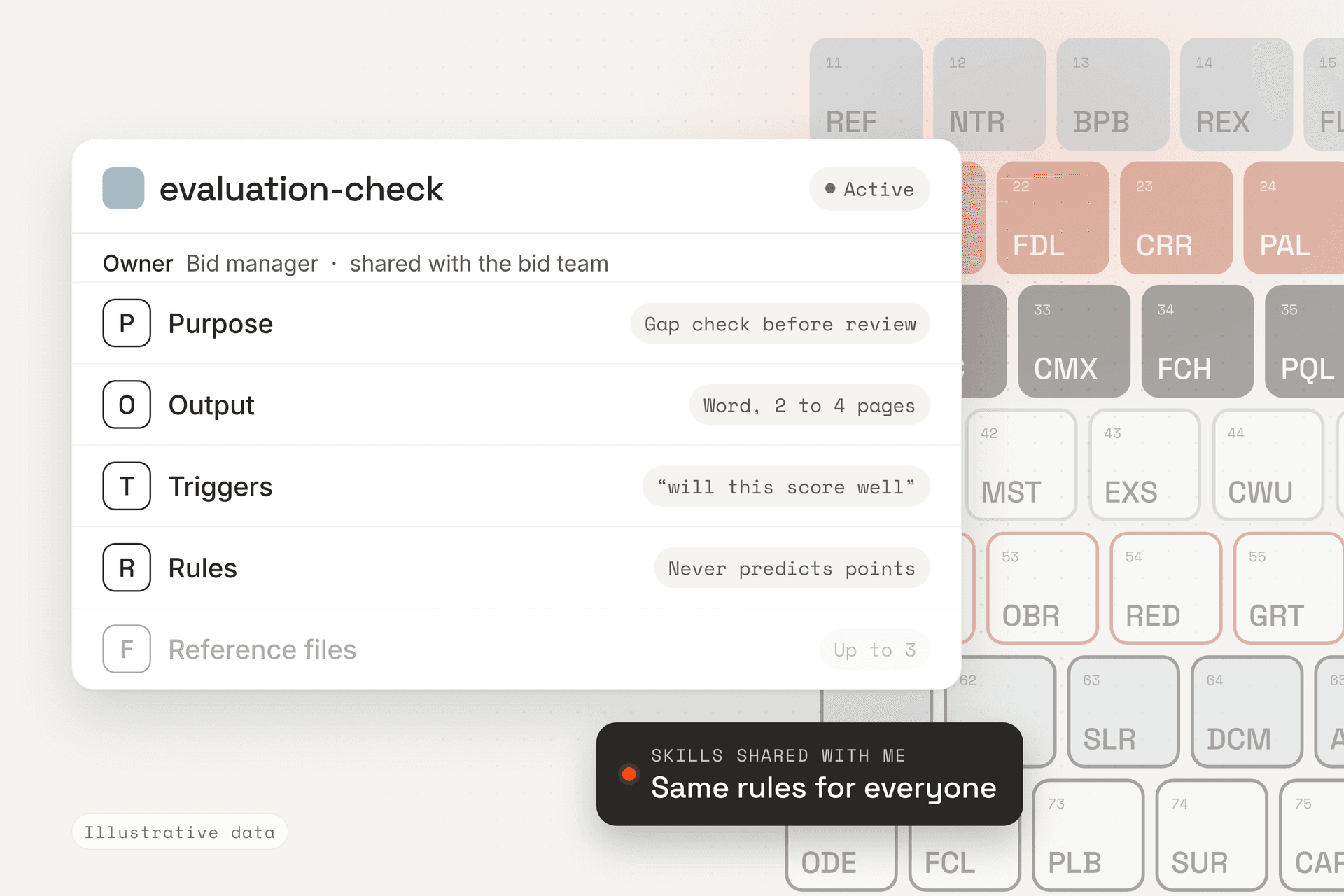
Every bid team has one. A prompt that reads a tender the way the team likes it, or checks a draft against the award criteria, or puts the company answer into the buyer's format. Someone wrote it in week two, tuned it over five tenders, and now it lives in their chat history.
Colleagues ask for it. It gets pasted into an email, then into a chat thread, then edited by someone who needed a slightly different table. Six months later there are three versions, and nobody knows which one produced the answer that scored well.
The fix is not a better prompt. It is writing the prompt down once, in one place, with one owner. In Atlas, that place is a skill.
Prompt or skill: what changes
Atlas keeps both in the Library. A prompt is saved text. You write it once and insert it into any chat with @prompt. You still decide when to use it, and it says the same thing every time.
A skill is an instruction set that Atlas follows. It states the task, what the output looks like, when it applies and which rules hold. Atlas uses a skill when a request matches it, or when you call it by name with @. A skill can also carry a template, a logo or a reference document.
Some skills come ready-made. The standard skills that create Word, PDF, PowerPoint and Excel files are maintained by the Atlas team, and your own skills build on them. Ask for a Word document in your skill, and Atlas uses the Word skill to make the file.
For a team, the difference is this: a prompt gets copied, a skill gets shared. Everyone who runs the shared skill runs the same instructions, and when the owner improves them, they all get the improvement.
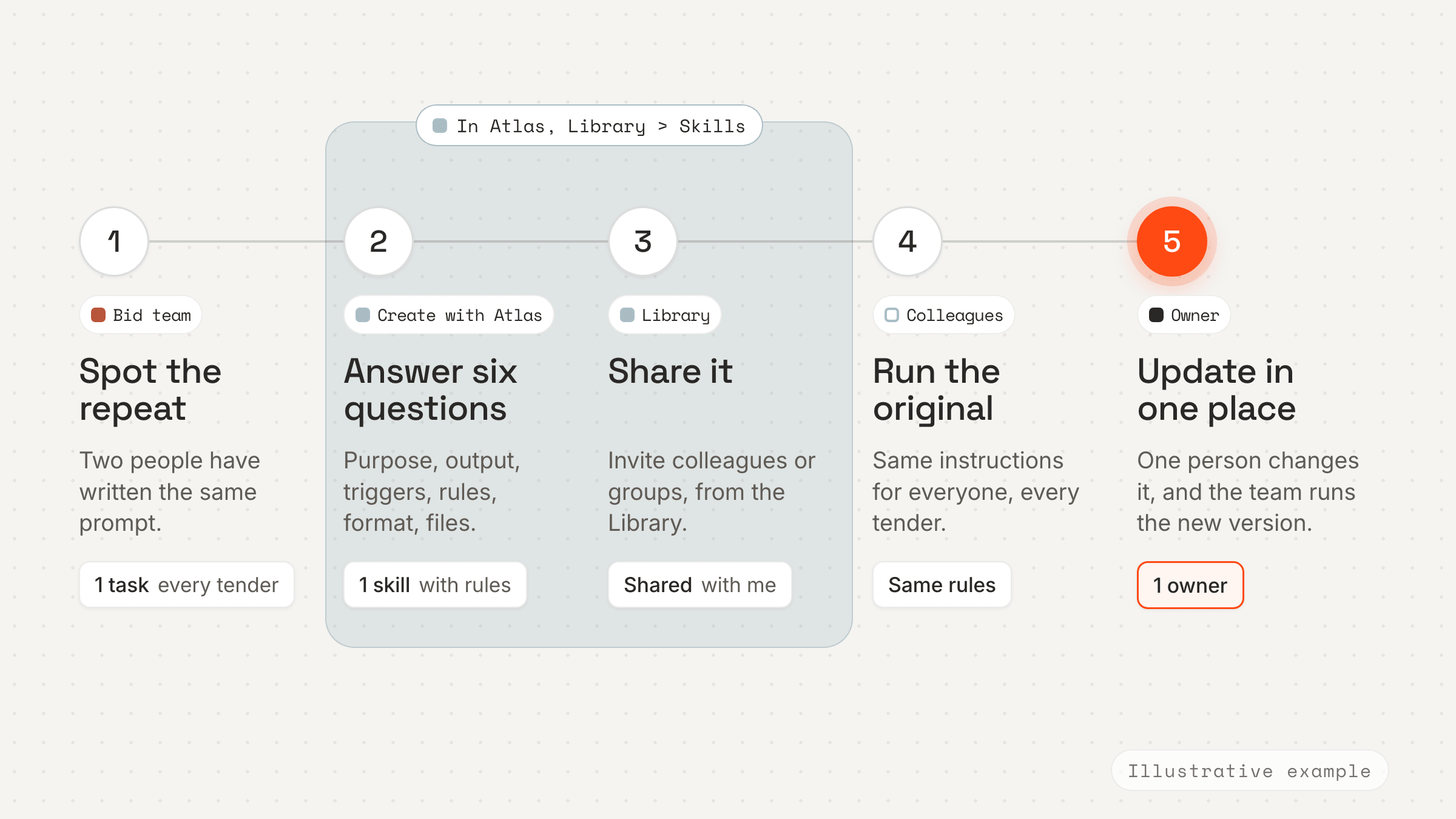
Pick the first skill: the task you do in every tender
Start with a task that comes back in every tender and that more than one person does. One customer bid team we worked with in November keeps skills for a bid/no-bid read, its standard answer template, a tender analysis, answers to the buyer's use cases, a proposal writer and an implementation plan. None of them is exotic. Each is a task the team already did by hand, or with a prompt, every time.
Good first candidates:
- An evaluation check. The draft answer against the award criteria and weights in the tender conditions, before internal review.
- A bid/no-bid read. The same questions asked of every tender, in the same order.
- Your answer template. How your company structures an answer, so a new writer starts from the house format.
- Brand guidelines. Atlas has an example skill for this. Two customer teams started there in November and made it their own.
A rule of thumb: if two people on the team have written the same prompt, it should be a skill.
Answer six questions
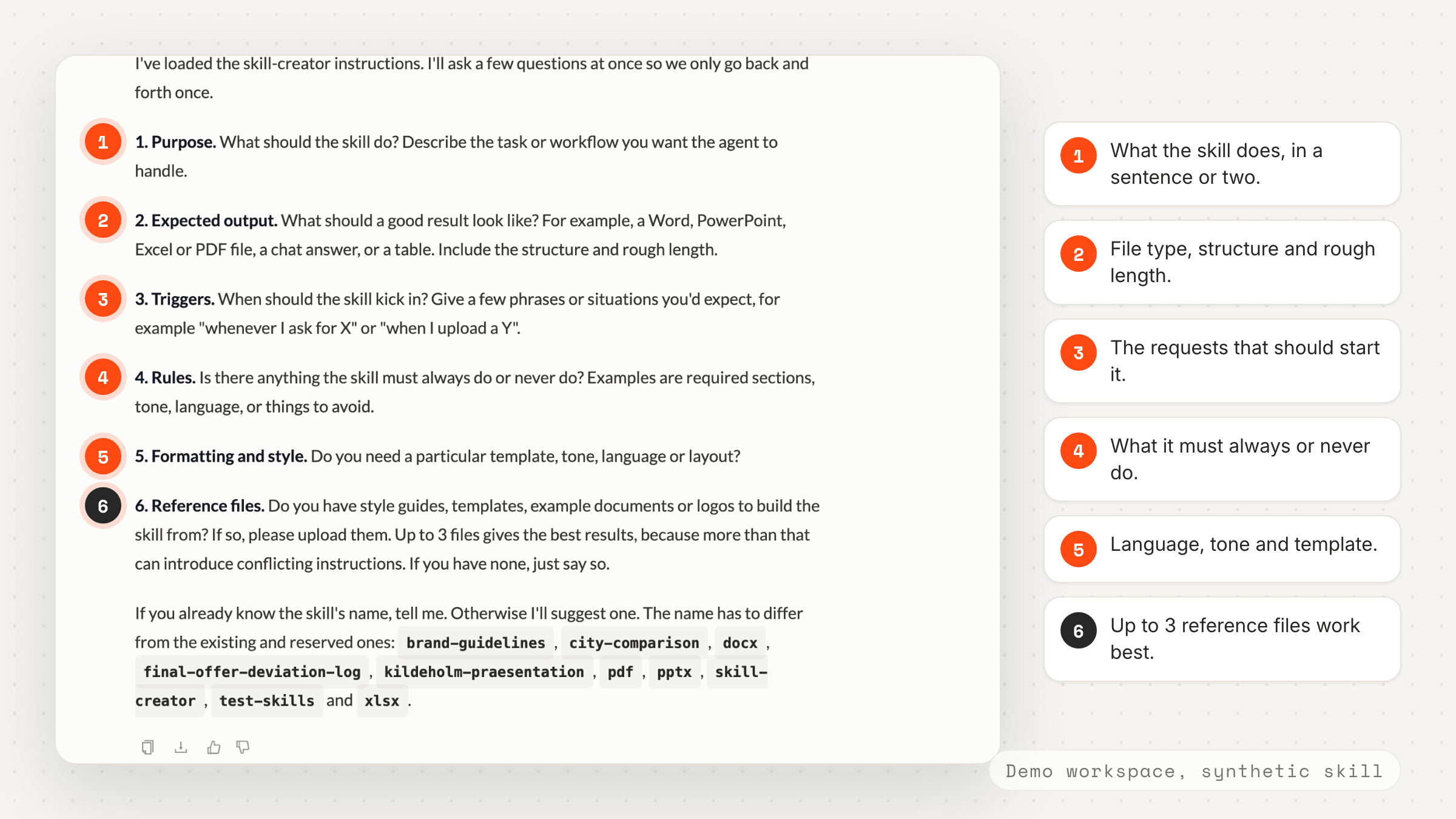
The fastest route is Create with Atlas, under the + in Library, Skills. It opens a chat in which Atlas asks six questions in one go. Answer them the way you would brief a new colleague:
- Purpose. What the skill does, in a sentence or two. "Check a draft answer section against the buyer's evaluation criteria before it goes to review."
- Expected output. File type, structure and rough length. "A Word document with one table: sub-criterion and weight, where the draft answers it, gap, suggested fix. Two to four pages."
- Triggers. The requests that should start it. "When I ask to check, score or review a draft against the evaluation criteria, or ask 'will this score well'."
- Rules. What it must always or never do. "Take the criteria and weights only from the tender conditions or the invitation letter, quoted with document and section. Never predict points. Do not rewrite the draft."
- Formatting and style. Language, tone and template.
- Reference files. A template, a style guide or a good example. Atlas asks for up to three, because more files tend to contradict each other.
The customer team above built its evaluation and scoring skill this way in one session: the purpose, Word as the output, the trigger, and rules that point to the criteria in the invitation letter.
The rules do most of the work. A skill without rules is a prompt with a name. Write down the rules your reviewers already apply by hand: where the facts must come from, what the skill may not decide, and what it does when the input is missing. When we built the example above, Atlas also proposed rules of its own and listed them separately, for example that a missing weight is marked "weight not stated" instead of estimated. Read that list before you click Add to Skills.
Two more things. The name is permanent, so name the skill for the job, not the tender: "evaluation-check", not "evaluation-check-municipality-x". The same customer team found this out when they needed a second scenario. They could not rename the first skill, so they made a new one. And if you already have a prompt that works, Write skill instruction lets you paste it in directly, without the questions.
Share it, and decide who owns it
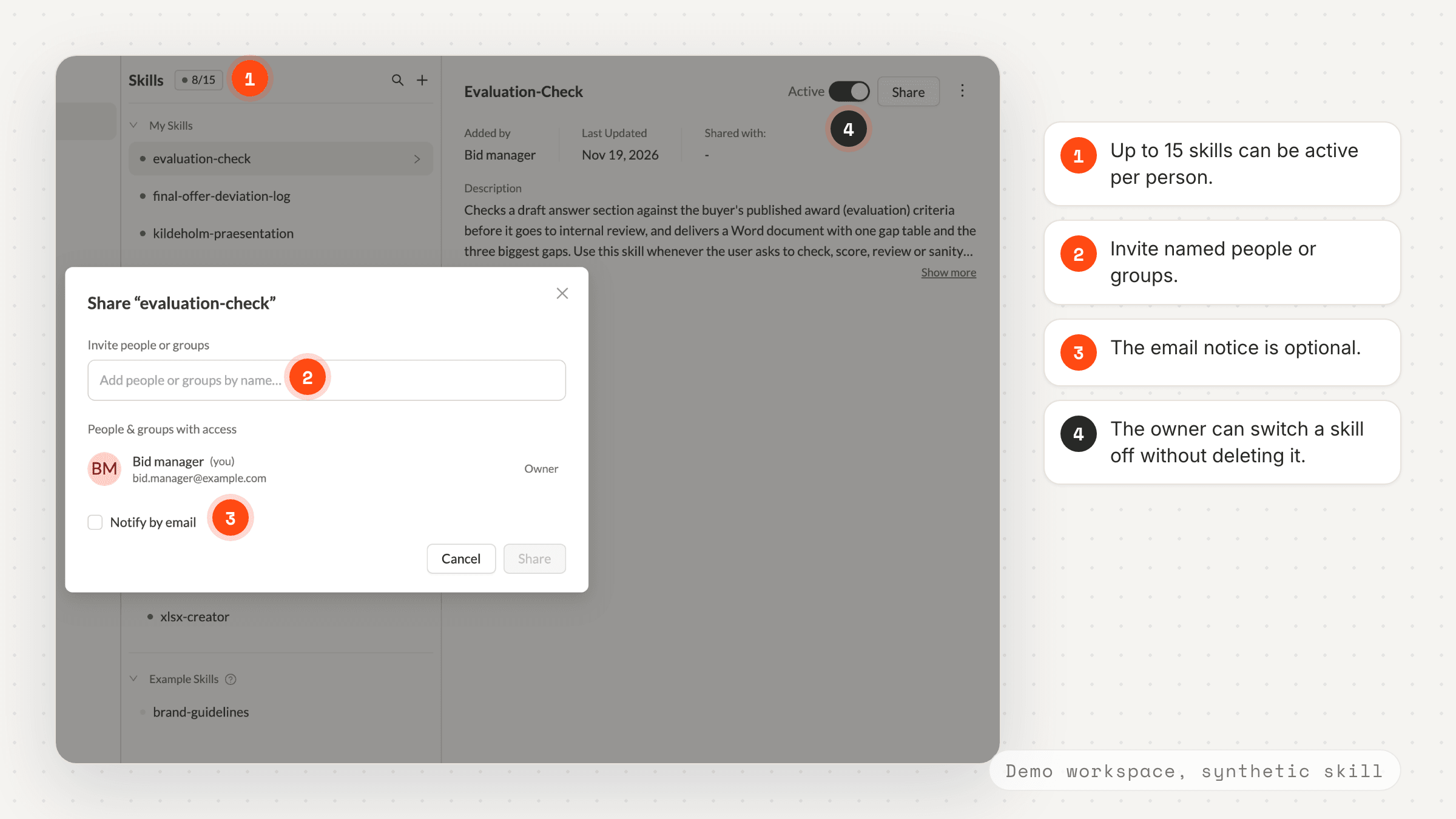
Open the skill in the Library and press Share. You invite named colleagues or groups, and you can tick Notify by email. Colleagues find it under Skills Shared with me.
Share from the Library, not from the chat. Sharing the chat where you built the skill shares the conversation, not the skill. In one customer session, the skill reached the right colleague only on the second try, from the Library.
Then the team decides how the skill is owned. A colleague can use a shared skill in two ways:
- Run the shared original. One person owns it and updates it, and every colleague runs the current version.
- Add to My Skills. The colleague gets their own copy to edit. The copy does not follow later changes to the original, and Atlas switches the original off for that person so the two do not clash.
For a team standard, such as the evaluation check or the answer template, run the original and name the owner. For a personal writing style, a copy is fine. One customer's bid writer is testing a skill built for them that "has a lot of rules and a lot of personal adaptation", and says it is "actually writing pretty well". That kind of skill should belong to the writer.
Plan for two limits. Each person can have up to 15 skills active at a time, so a team library needs pruning. And deleting a shared skill removes it for everyone who has not made a copy, so only the owner deletes.
What a skill does not do
It does not replace the review. A skill proposes, and a person approves. The skill in our final offer deviation log post fills in the log and leaves every line it cannot settle as Open for the legal owner.
It does not fix weak input. If the tender files are not in the proposal, or the company profile is thin, the output is thin too. A rule can tell the skill to say so and stop. It cannot fill the gap.
And it cannot be renamed. A new name means a new skill, and colleagues have to switch to it.
Start with one
One task the team repeats in every tender. One person who owns it. One skill, shared from the Library. One review step after it. Add the second skill when everyone who does the first task is using the first skill.