Re-issued tender packages: start with what changed
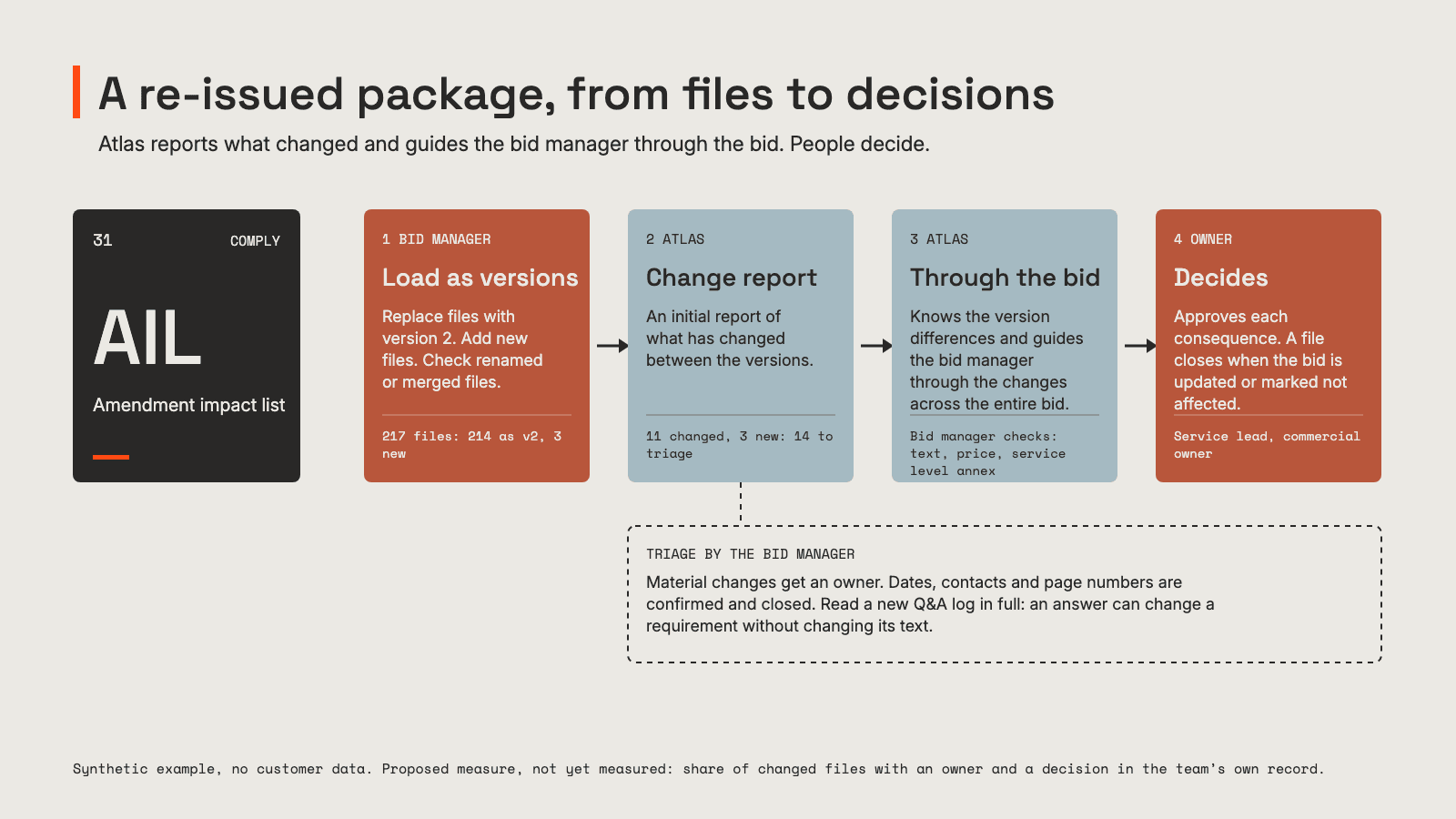
A tender amendment rarely arrives as one sentence. It arrives as a new package of hundreds of files. Here is a method, with a made-up example: load it as versions, read the change report, follow each change through the whole bid, and let an owner decide each consequence.
Pentimenti team
A tender amendment rarely arrives as one tidy sentence. It arrives as a new package.
In a large tender that means hundreds of files again. The requirements specification, the annexes, the pricing schedule, the draft contract, the Q&A log. Some are new versions. Some are new files. Most are the same as last time, and nothing on the outside tells you which.
By then the bid team is weeks into writing. The question is not what the buyer said. It is which files changed, how, and what in your bid rests on them.
Late changes are normal. Under the EU public procurement directive, a buyer must extend the deadline when the changes to the procurement documents are significant (Article 47(3)(b)). National rules and the tender set the details. The documents change after you have started writing, and the clock does not always move with them.
Here is a method for handling a re-issued package, and where Atlas does the work. The example is made up. The tender, the file names and the counts are synthetic, so nothing in it belongs to a real buyer or bidder.
The setup: package 2 lands
An IT services framework. The first package had 214 files. Three weeks before the deadline, the buyer publishes package 2: 217 files, and a two line note saying the documents were updated following questions received.
That note is not a change log. Treat it as a claim to check.
Step 1: load the package as versions, not as a new tender
The tempting move is a new folder called "package 2" and a fresh start. It throws away the one thing you need: the link between each old file and its replacement.
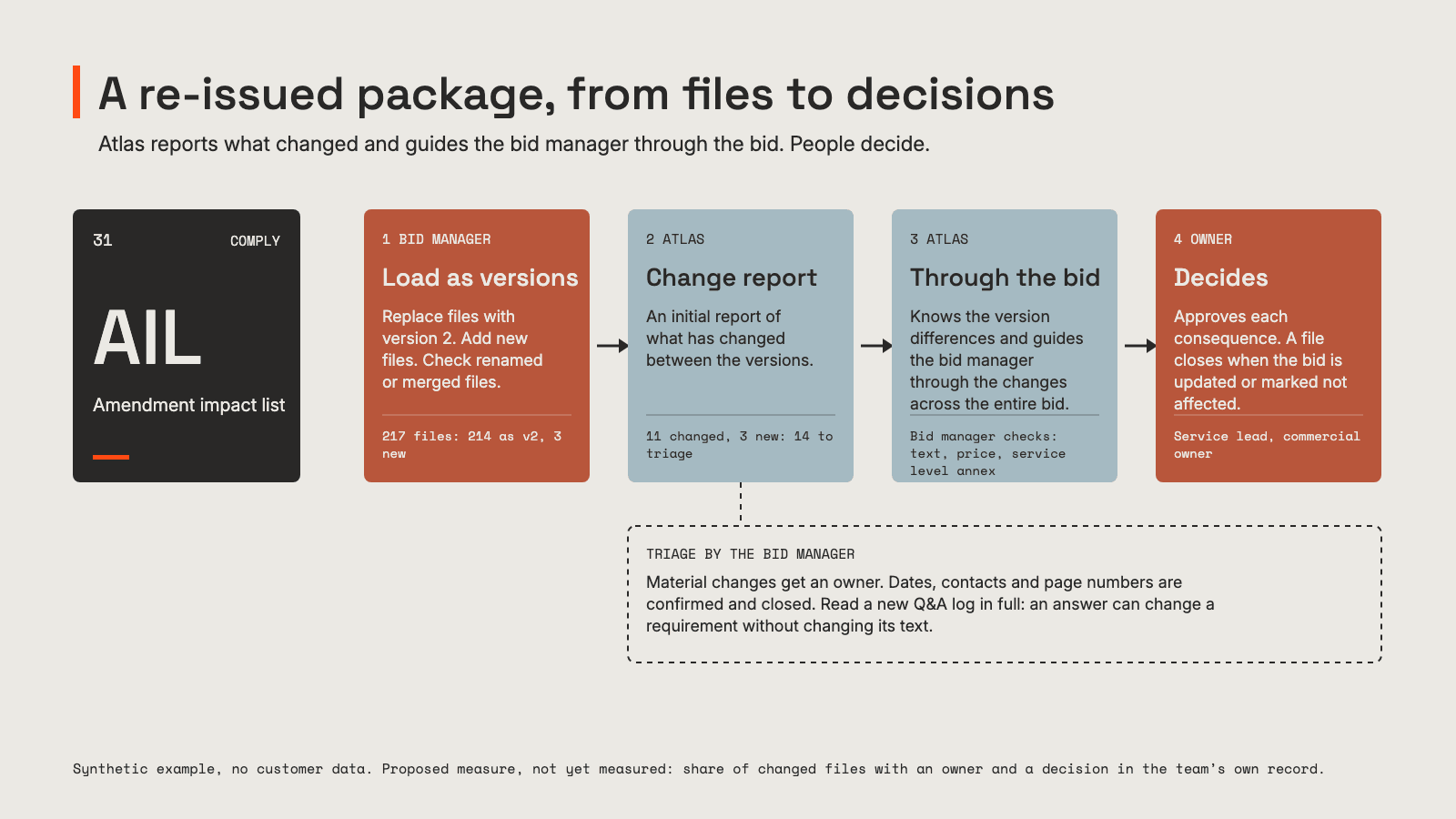
In Atlas, the bid manager loads package 2 into the same tender. A file that replaces an earlier one goes in as version 2 of that file. A file that did not exist before goes in as a new file. In the example, 214 files go in as version 2 and 3 go in as new files.
Check the matching where the buyer has renamed, split or merged files. Everything after this step rests on it.
Step 2: read the change report before you touch the answer
Once the package is in, Atlas produces an initial change report of what has changed between the versions. In the example, 11 of the 214 replaced files have changed. Add the 3 new files, and the bid manager has 14 files to deal with instead of 217.
The report tells you what changed in the tender. It does not yet tell you what that means for your bid. So the first pass is triage, done by the bid manager:
| File | What changed | Triage |
|---|---|---|
| Requirements specification v2 | Priority 1 incident response from 4 hours to 2 | Material: service and price |
| Annex B v2, submission format | Page limit for the solution description from 20 to 15 | Material: format |
| Pricing schedule v2 | New line for on-call cover | Material: price |
| Draft contract v2 | Liability clause reworded | Legal review |
| 7 other files, v2 | Dates, contact details, page numbering | Confirm and close |
| Q&A log, new file | 38 answers | Read in full |
| 2 other new files | A supplier declaration and a revised order form | Assign an owner |
The Q&A log is the file to read most carefully. An answer can change what a requirement means without changing a word of the requirement. A comparison of the specification will not show that, because the specification did not change.
Step 3: follow each change through the whole bid
A change in one tender file rarely stays in one place in the bid. Atlas knows the difference between the versions and guides the bid manager through the changes across the entire bid.
Take the response time. Without a tool, the 4 hour figure sits in three places in the draft, and the bid manager has to find and check each one: the service description, the staffing assumption behind the price, and the service level annex in the contract response. The writing change is easy to spot. The price change is the one people forget. If only the text is updated, the bid promises 2 hours at a price built for 4.
The page limit is a different kind of change. Nothing in the content is wrong. The solution description is 19 pages and now has to be 15, so someone has to decide what goes.
Step 4: people decide the consequences
Every material change gets an owner and a decision. The service lead decides whether 2 hours is deliverable at all, before anyone writes it into the bid. The commercial owner reprices the on-call cover. The bid manager decides what to cut from the solution description.
Some calls never belong to the tool. Whether a change is significant enough to ask the buyer for more time. Whether to commit to a new service level. Which document wins when a Q&A answer contradicts the specification. Those go to a person, with both sources in front of them.
Step 5: close every changed file before submission
A changed file is closed when its owner has decided, and the affected parts of the bid are updated or marked as not affected. The bid manager goes through the open ones at the daily stand-up, not at the final review.
At submission this is also the team's own record, kept by the bid team, not an audit trail in Atlas. If anyone later asks why the bid commits to 2 hours, there is an answer: which version changed it, and who approved the consequence.
What Atlas does, and what it does not
In this workflow, Atlas:
- takes a re-issued package as version 2 files and new files in the same tender
- produces an initial change report of what has changed between the versions
- knows the difference between the versions and guides the bid manager through the changes across the entire bid
It does not decide what a change means for the bid commercially or legally, and it does not approve anything. The owners do.
Two checks stay with the bid team. Check the matching in step 1, especially for renamed, split or merged files. Check scanned pages and drawings by hand.
How to know it works
We have not measured this, so here are the two measures we would use.
- The share of changed files that have an owner and a decision in the team's own record at submission.
- The number of findings in the final review that trace back to an amendment.
If the first goes up and the second goes down, the method is working. Count those, not the number of files compared.
Where this sits
Amendment handling is element 31 (AIL) in our periodic table of commercial work, in the Comply family, where it is called the amendment impact list. Its neighbours: the tender consistency check (TCC) handles two tender documents that disagree, and the compliance matrix (CMX) maps every requirement to the answer section that meets it. Each element follows the same shape: one input, one agent task, one human gate, one measure.
The full table, with every element, is at /periodic-table.